Flume "Holdin On" Serum Tutorial & Breakdown
We're back with the last tutorial (for now) in our Flume series, and this time it's "Holdin On". The track is certified double platinum and has always been one of our favorites in Flume's catalog. As simple as it may seem, it hides several sound design tips we think will be useful to all of you. Below we remake the intro keys, the chorus chords, the arp, the breakdown synth, the Wurlitzer-style keys and the lead in Serum, with audio and settings for each.
RELATED BREAKDOWNS
The Intro Keys
If you've read our previous articles, you may have noticed that Flume loves sine waves for his intro synths, always with small variations. This time it's a little darker, with lots of body and very little treble.
This patch only needs oscillator "A" with an Analog_BD_Sin wavetable. The filter cutoff should be at 800 Hz, and envelope 1 has a 5 ms attack, a 1.2 s decay and a sustain of 14 dB, and modulates the wavetable position of oscillator "A". That's it.

The Chorus Chords
We love making this patch. Its waveforms are quite simple, but the magic is in the modulation: listen closely and you'll notice a shimmering effect, plus sidechain. Here's how we did it.
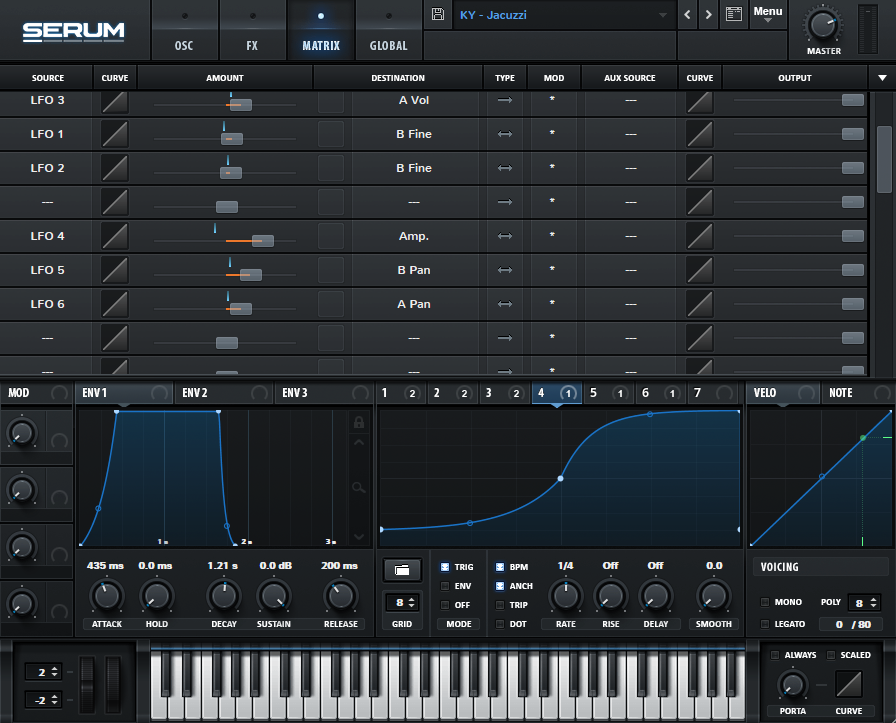
First, we need a Basic Shapes waveform in its second position in oscillator "A" and a saw wave in oscillator "B", with four to six voices on each oscillator, slightly detuned. Envelope 1 has an attack of 435 ms and a sustain of 0 dB. For the shimmer, LFO 3 modulates the level of both oscillators at a 1/32 note rate.

We've explained how we sidechain inside Serum before, but this time let's show you. First, draw a sidechain shape in an LFO (in this case LFO 4), then go to the Matrix and assign it to the Amp in the Global tab, like in the image below.
The Arp
This was a challenge, not because of the preset but because of the melody, so here's a tip that helps me get melodies right. Put the track you want to remake on an audio track, set the warp mode to Complex Pro and slow it down by around 20 to 30 BPM. You'll hear each note more clearly, which makes it easier to recreate.
For the sound design, you need a square wave in oscillator "A" and a sawtooth wave in oscillator "B". This time the filter gives the patch its character: set it to Low 18, with the cutoff at 1750 Hz and the resonance at 50%. Then, in the FX tab, use a compressor with the multiband option on and bring up the highs a little.


The Breakdown Synth
This preset took several failed attempts before we struck gold. To make this wobbly synth we need a PWM C64 wavetable in oscillator "A" and a Basic Mini in oscillator "B". Both need only one voice; this is important, and we'll explain why after this image.

The trick to making it wobbly is to use an LFO (in this case LFO 1) to modulate the size of the reverb, and the effect is more noticeable when both oscillators have only one voice.

The Wurlitzer-Style Keys
We loved making this sound. We tried to emulate a Wurlitzer and think we got pretty close. We started with a sine wave in oscillator "A" and a Kream wavetable in oscillator "B".
The trick is LFO 3, which modulates the level of both oscillators and the filter cutoff at a 1/16 note rate. The filter is a Band 12, which cuts both the low end and the high end of the spectrum.

The Lead
This lead is quite simple, but it plays an important part by giving the song a melody at the end to wrap things up.
We use a Basic_Mdc in oscillator "A" around the middle of its wavetable position and a square wave in oscillator "B". LFO 1 acts as a sidechain on the level of both oscillators and on the cutoff of the Cmb HL6 filter.

 SERUM 1 + 2
Next step
Make your own Holdin On-style track.
You've heard how the keys, chords, arp, synth and lead are built. Load the pack and write a track of your own around them.
Future Bass Pack · $24.90
GET THE FUTURE BASS PACK20% off with code FB01
If you read all the way through, you deserve a freebie: Skin, our free pack inspired by Flume and Mura Masa.